7 CTR Tool Mistakes That Undercut Organic CTR Campaigns
You set up a CTR campaign, picked keywords, and paid for visits, but the keyword never moves. Most undercut campaigns fail on setup choices, not on the tool itself: the wrong device mix, a keyword your page cannot rank for, or settings left on default.
This article walks through seven mistakes that quietly drain CTR campaigns and shows how to fix each one. You will learn how the Top 100 rule filters keywords, why location and daily search count settings matter, how screenshot proof and credit management protect spend, and when Maps and AI Overview campaigns deserve a slot.
What Is CTRTool? Campaign Types, Platforms and Who It Serves
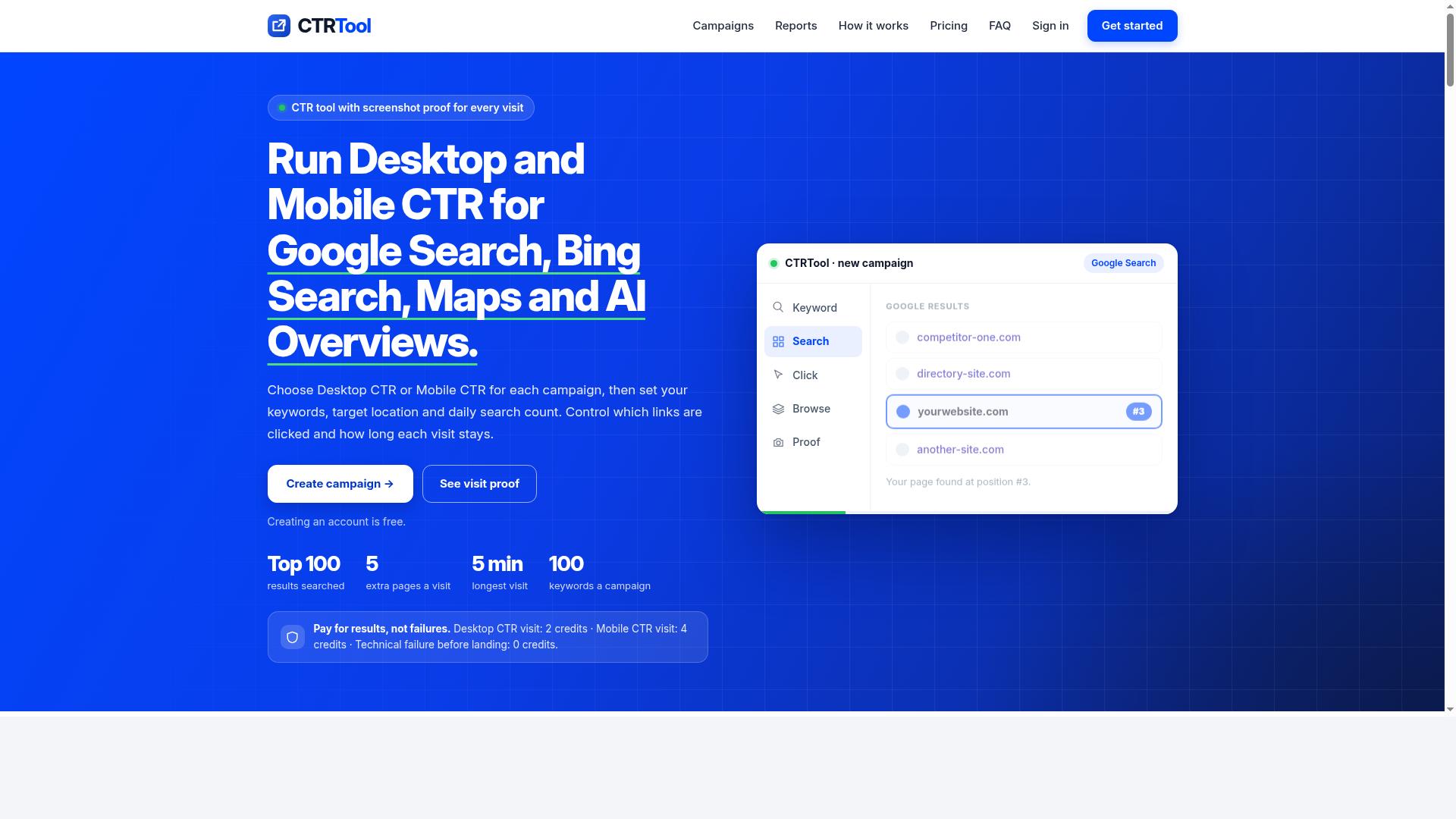
CTRTool is a SaaS platform that runs organic CTR campaigns for Google Search, Bing Search, Google Maps, and AI Overviews, providing screenshot proof for every visit. In plain terms, it is a CTR tool built to simulate the organic clicks a result would receive if real searchers kept choosing it over the listings around it.
The purpose is straightforward. CTRTool helps SEO practitioners and agencies influence the click-through rate a page earns on a search engine results page, rather than leaving that metric to chance. Every campaign is delivered as a record the user can inspect, not as an anonymous traffic spike.
Two campaign types are available. Users pick Desktop CTR or Mobile CTR per campaign, which matters because desktop and mobile SERPs behave very differently in layout, snippet display, and click patterns. Running the wrong device type against a mobile-first audience undercuts the whole exercise.
Within a campaign, the operator sets the keywords, the target location, and the daily search count. They also control which links get clicked and how long each visit stays on the page. Those controls are what separate a deliberate organic CTR campaign from random bot traffic.
The platform serves SEO practitioners and agencies who already understand keyword targeting, search intent, and query relevance. It is not a beginner's shortcut to rankings. The site itself states plainly: Automated visits do not guarantee rankings.
That honesty is worth noting. It frames CTRTool as a lever for CTR optimization and click volume, not a promise of position one. Users still need solid title tags, meta descriptions, and structured data to convert simulated visits into a credible signal.
The standout differentiator is screenshot proof for every visit. Instead of asking clients or stakeholders to trust a dashboard number, agencies can show what actually happened during a campaign. That evidence trail is useful for reporting, for quality checks, and for spotting mistakes early, such as a campaign pointed at the wrong location or the wrong device type.
Because CTRTool covers Google Search, Bing Search, Maps, and AI Overviews, it spans both classic blue-link results and newer surface types. Maps campaigns suit local pack visibility, while AI Overviews coverage reflects where clicks increasingly originate. Together, these campaign types give SEO teams a way to test CTR behavior across the surfaces that matter most in modern search.
Do These 7 Mistakes Really Undercut CTRTool Campaigns?
Even with a tool like CTRTool, common mistakes can sabotage your organic CTR campaigns. Here are seven pitfalls that frequently undermine results. The question is not whether a CTR tool works. It is whether the people running it avoid the errors that quietly drain performance.
The seven mistakes covered in this article range from keyword selection to tracking. Some happen before a single title tag is written. Others creep in during snippet testing or surface weeks later when click volume fails to match expectations. Each one is easy to overlook and costly to repeat.
What makes these errors so damaging is how they compound. A weak keyword choice lowers query relevance, which drags down click-through rate, which in turn hides the value of good copywriting. Fix one and the next becomes visible. Ignore them and the campaign looks broken even when the tool is working exactly as intended.
Consider a simple example. A page ranks well for a broad term but competes with a featured snippet and an image pack on the same search engine results page. The impression share looks healthy, yet real clicks stay flat. That gap usually traces back to one of the mistakes below, not to the platform itself.
Here is what the following sections will walk through:
- Errors tied to keyword targeting and search intent
- Weak title tags and meta descriptions that fail to earn the click
- Missed opportunities around rich snippets and structured data
- Testing habits that produce noise instead of insight
- Tracking gaps that hide what is actually happening
Avoiding these mistakes is not optional polish. It is the difference between a campaign that steadily improves and one that stalls. Discipline at each stage, from keyword choice through measurement, decides whether CTR optimization pays off.
The good news is that every one of these pitfalls is fixable. None requires abandoning your approach or starting over. They require attention to detail and a willingness to check assumptions before scaling. Read the sections that follow with your own campaigns in mind, and note which patterns sound familiar.
By the end, you should have a clear picture of where organic CTR campaigns most often go wrong and how to steer around each trap. Small corrections early protect the results you are working to build.
Mistake 1: Targeting Keywords Your Page Can't Rank For
One of the most common errors is selecting keywords for which your page doesn't appear in the top 100 organic results, rendering your CTR campaign ineffective from the start. It is an easy mistake to make. A keyword may look promising in a planner, but if your page is buried beyond the first ten results pages, no amount of campaign setup will rescue it.
CTRTool is built to simulate clicks on results that already exist within the top 100. If your page isn't there, there is nothing for the system to work with. The campaign simply cannot produce visits, and your budget sits idle while you wait for movement that won't come.
This is why keyword targeting and ranking position must be checked together before any organic CTR campaign goes live. The keyword has to match search intent, and the page has to be eligible. Skip either check and the whole effort stalls at the starting line.
It also helps to be clear about what CTRTool does and does not promise. The platform explicitly does not guarantee higher rankings, leads, or sales. It works with pages that already rank. Choosing keywords your page can't rank for breaks that basic condition and wastes the campaign.
Why the Top 100 Rule Matters and How to Check It
CTRTool requires that your page appear within the top 100 organic results for the chosen keyword and location; otherwise, the campaign cannot generate visits. Location matters as much as the keyword, because rankings shift by country, state, and city.
A quick verification routine prevents most of these failures:
- Use a VPN or a location emulator set to your target market.
- Open a private or incognito window so personal history doesn't skew results.
- Search the exact keyword and count through the results pages up to page ten.
- Record the position where your page appears, or confirm it is absent.
Some rank tracking tools can automate this check across many keywords and locations, which is useful when you manage a large list. Manual searches are still worth doing for priority terms, since they reflect what a real searcher sees on that search engine results page.
If your page falls outside the top 100, the fix is on-page work, not campaign tweaks. Strengthen the title tag and meta description for relevance and click appeal. Improve internal linking, tighten content around query relevance, and add structured data or schema markup where it earns a richer result. Recheck the ranking before you submit the keyword.
Adjust your keyword strategy based on what the data shows. If a head term is out of reach, move to a long-tail keyword where your page already ranks. Watch for keyword cannibalization too, where two pages compete for one query and split their strength. When a keyword simply isn't viable, replace it rather than force it. CTRTool allows up to 100 keywords per campaign, so there is room to build a list around terms your pages genuinely qualify for.
Mistake 2: Running the Wrong Device Mix (Desktop vs Mobile CTR)
Choosing the wrong device targeting, desktop versus mobile, can skew your CTR data and waste credits, as user behavior differs significantly across devices. CTRTool lets you build separate Google Search CTR and Bing Search CTR campaigns for Desktop or Mobile, so the choice is deliberate. Picking the wrong one, or ignoring the split entirely, is one of the most common ways an organic CTR campaign loses its footing.
Desktop and mobile search results do not look the same. Titles get truncated, sitelinks and rich snippets render differently, and the number of results visible above the fold changes. A click pattern that looks natural on a large screen can appear unrealistic on a phone, and vice versa.
CTRTool delivers its sessions through Desktop Chrome windows and real Android phone sessions matched to the target location through managed proxy routes. That means each campaign type behaves like the device it emulates. Mixing the two carelessly, such as running a mobile campaign against a site that mostly serves desktop users, creates a mismatch between your traffic and the device profile your analytics expect.
Before you pick a device, look at real evidence. The right mix usually comes from three sources:
- Your own analytics: check the device breakdown for the exact pages and keywords you plan to target. If most of your organic visitors arrive on mobile, a desktop-heavy campaign will look out of place.
- Industry norms: some niches skew heavily toward phones, while others stay desktop-first. Compare your split against what is typical for your sector rather than assuming.
- Campaign goals: if you want to test how a mobile title tag or meta description performs in the SERP, target mobile. If you are measuring desktop rich snippet visibility, target desktop.
Use your analytics to set a rough ratio, then build separate campaigns in CTRTool that reflect it. Running both device types in proportion to your real traffic is far safer than defaulting to one.
A mismatched device mix rarely fails loudly. Instead, it shows up as odd patterns that search engines and analytics filters can flag. For example, a site with almost no mobile traffic suddenly receiving steady mobile clicks on a desktop-oriented keyword is a visible inconsistency. The same applies in reverse: desktop sessions on a page whose audience is overwhelmingly phone-based.
Beyond filters, the campaign simply underperforms. If your target keyword shows a weak mobile result layout, mobile clicks may not represent the behavior you are trying to encourage. Your CTR benchmark data becomes noisy, and credits go toward sessions that do not match your goals. Alignment between device, page, and audience is what keeps an organic CTR campaign credible.
The fix is straightforward: confirm your device split with analytics, build device-specific campaigns in CTRTool for Google Search CTR or Bing Search CTR, and review the full visit paths and screenshots in your reports. If the data still looks off, adjust the mix before scaling spend. Correct device targeting protects both your budget and the realism of your results.
Mistake 3: Ignoring Location and Daily Search Count Settings
Failing to configure location and daily search count settings properly can result in campaigns that don't match your target audience's behavior or exceed realistic search volumes. Both settings shape how natural a campaign looks to search engines, and both are easy to overlook when the focus stays on keywords and titles.
CTRTool is a global online service with no country restrictions, and campaigns can target a chosen country with an optional state and city. That flexibility only pays off when the settings reflect where your actual audience searches from.
Location accuracy matters because a search from the wrong region can distort the signals you are trying to build. If your organic CTR campaign targets local buyers, a state and city pair keeps impressions tied to the right market. For broader reach, selecting "Any country" uses a mix of supported locations, which suits campaigns without a single geographic focus.
Daily search count is the second half of the problem. Set it too high and the click volume can look unnatural against a keyword's real impression share. Set it too low and the campaign may never move the needle on ranking position or CTR benchmarks.
As a practical starting point, match daily volume to keyword size and industry:
- Long-tail keywords with modest search demand: keep daily counts low so click volume stays proportional
- Mid-volume commercial terms: a moderate daily count that builds gradually over the campaign
- High-volume head terms: larger daily counts can be justified, but ramp up slowly and watch for unnatural patterns
- Local campaigns: tie the count to the population and search demand of the targeted city or state
These ranges are directional, not fixed rules. The right number depends on your keyword targeting, search intent, and how competitive the SERP is for your chosen terms.
Before launching, confirm the country, state, and city fields match your target market, and sanity-check the daily count against realistic click volume for each keyword. A quick review at setup prevents a campaign that looks artificial or one that quietly underdelivers.
Mistake 4: Skipping Screenshot Proof and Visit Path Review
Overlooking the screenshot proof and visit path data that CTRTool provides for every visit means missing out on crucial verification and optimization insights. It is one of the easiest mistakes to make because the campaign itself appears to be running. The problem is that appearances can hide real failures, and the proof data is what separates a verified campaign from an assumed one.
CTRTool records search and landing screenshots as separate proof images for each visit. That split matters. One image shows how the listing appeared on the search engine results page, and the other confirms where the visitor actually landed. Together they form a verifiable record rather than a claim.
Each visit also comes with a full visit path. This shows the route a visitor took through the site, including up to 5 additional internal pages within a visit of up to 5 minutes. Reviewing that path tells you whether the journey matched the intent behind the keyword you targeted.
Campaign managers who skip this review lose two things at once. They lose verification, because nothing confirms the visit behaved as expected. They also lose diagnostic signal, because the proof images and paths are where problems show up first.
Reviewing the screenshots is a quick, repeatable routine. Work through three checks for each visit:
- Confirm the search screenshot shows the correct title tag, meta description, and ranking position for the targeted keyword.
- Confirm the landing screenshot shows the intended page, not a redirect, a 404, or an unrelated URL.
- Confirm the visit path stays within the pages you expected visitors to see.
The landing screenshot check is where the most serious issues surface. A wrong landing page can send visitors to content that does not match their search intent, which wastes the visit and can distort any later click-through rate reading. Without a landing screenshot as proof, that mismatch can go unnoticed for an entire campaign cycle.
Visit path data is just as useful for optimization as it is for verification. If visitors consistently stop after the first internal page, your internal linking may not be guiding them deeper. If paths cluster around one section, that section is doing the persuasive work and deserves stronger links from high-traffic pages.
Use the paths to refine internal linking and user flow. Add contextual links from pages that appear early in paths toward the pages that support conversion. Where a path ends abruptly, check whether the next logical link is missing or buried.
There is a practical safety net worth knowing. CTRTool uses a pay-for-results credit model, and no credits are charged for technical failures before landing. Visits that cannot verify the requested location also use no credits. That protects your budget, but it does not replace review. You still need to look at the proof to understand what happened and why.
Skipping the proof review turns a transparent system into a black box. The screenshots and visit paths are already recorded for every visit, so the only cost of checking them is a few minutes. The cost of not checking is undetected problems that quietly undercut the whole organic CTR campaign.
Mistake 5: Mismanaging Credits and Campaign Limits
Poor credit management can quickly deplete your CTRTool balance without yielding meaningful results, especially if campaigns are not properly scoped. Credits are the unit of spend, and every visit type has a different price. A desktop CTR visit costs 2 credits, while a mobile CTR visit costs 4 credits. A verified search without a match costs 1 credit, and a technical failure before landing costs 0 credits.
That gap between desktop and mobile matters more than most users expect. On the Starter plan at $59/month, 2,000 credits stretch to up to 1,000 desktop visits or 500 mobile visits. A campaign planned around mobile traffic on that tier runs out twice as fast as one planned around desktop.
Three mistakes show up again and again:
- Overestimating needed visits. Setting targets far above what a page or keyword can absorb wastes credits without moving click-through rate.
- Not monitoring credit usage. Running a campaign for weeks without checking the balance leads to surprise exhaustion mid-flight.
- Running several campaigns at once without a budget. Parallel campaigns compete for the same credit pool, and none of them gets enough volume to produce readable results.
The fix is discipline. Start with small test campaigns to learn how a keyword responds before scaling. Use the pay-for-results model so failed attempts do not drain your balance. Set daily limits so a single campaign cannot consume the month's credits in a week. Also remember that unused credits roll over while your subscription is active, so a modest buffer is not wasted money.
How CTRTool's Pay-for-Results Model Prevents Wasted Spend
CTRTool operates on a pay-for-results model where credits are only consumed when a visit is successfully delivered, helping prevent wasted spend on failed attempts. Under a flat-fee arrangement, you typically pay for the campaign regardless of what happened. Here, an attempt that fails for a technical reason before landing costs 0 credits.
Consider a keyword that temporarily drops out of the top 100 results. On a flat-fee model, that spend is simply gone. With CTRTool, a verified search that finds no match is charged just 1 credit rather than the full visit price, so a ranking slip does not wipe out your budget. The full 2 or 4 credit cost only applies when a visit is actually delivered.
Each plan includes a set number of credits per month:
| Plan | Price | Credits | Desktop Visits | Mobile Visits |
|---|---|---|---|---|
| Starter | $59/month | 2,000 | Up to 1,000 | Up to 500 |
| Growth | $125/month | 5,000 | Up to 2,500 | Up to 1,250 |
| Scale | $399/month | 20,000 | Up to 10,000 | Up to 5,000 |
| Agency | $699/month | 40,000 | Up to 20,000 | Up to 10,000 |
The Growth plan is marked as Recommended, which suits teams that have validated a campaign and want room to scale. Creating an account is free, so you can plan your credit math before committing. Match the tier to your realistic click volume, and the pay-for-results structure does the rest.
Mistake 6: Neglecting Maps and AI Overview Campaigns
With the rise of local packs and AI Overviews in search results, ignoring Maps and AI Overview campaigns means missing valuable opportunities to influence CTR in these emerging SERP features. Many teams pour every resource into classic blue-link rankings and treat these newer surfaces as an afterthought. That leaves two high-visibility placements working against you instead of for you.
CTRTool addresses both gaps directly. Its Google Maps CTR campaign type finds a business listing and clicks through to its website link, while its AI Overview CTR campaign type locates your site within the overview and clicks the source link. Both are built to influence click-through rate on SERP features that now sit above or beside traditional organic results.
Why does this matter? Local searches often lead to purchases, so a listing that gets seen but not clicked is a lost sale. AI Overviews are increasingly prominent, and the source links inside them compete for the same attention as a featured snippet or knowledge panel. A CTR optimization plan that skips these surfaces is only covering part of the search engine results page.
The Maps campaign is especially useful for multi-location businesses. It supports city targeting and checks up to 50 listings per campaign, which suits brands managing many storefronts or service areas. Instead of guessing whether a listing earns attention, you can work the listing the same way you would a title tag or meta description.
Setting up Maps campaigns the right way
Before any campaign runs, make sure the business listing is claimed and fully optimized. Accurate categories, hours, photos, and service details give the listing a fair chance to appear in the local pack in the first place. A campaign cannot rescue a listing that is unverified or thin on information.
Once the listing is solid, build the campaign around the cities that matter. CTRTool lets you target by country, state, and city, or leave the country as Any. Reports then show Maps listing order over time, so you can see how the listing moves as the campaign runs.
Setting up AI Overview campaigns the right way
AI Overview campaigns depend on relevance. Your content needs to match the query intent closely, or the overview has little reason to surface your page as a source. Review the questions your audience actually asks and make sure a page answers each one directly.
In CTRTool, the AI Overview campaign finds your website in the overview and clicks its source link. Reporting tracks AI citation order, which shows where your source sits among the cited links. Because citation position shapes how much attention a link receives, this is a metric worth watching alongside ranking position.
Both campaign types fit the same setup framework as the rest of the platform: up to 100 keywords per campaign, search depth up to 100, and daily search counts with now, spread out, or gap timing. Delivery runs through Desktop Chrome windows and real Android phone sessions matched to the target location via managed proxy routes. For teams serious about CTR optimization across every SERP feature, these two campaigns close a gap that most competitors in the space ignore.
Mistake 7: Not Tracking Keyword Positions Over Time
Failing to monitor keyword positions over time makes it impossible to correlate CTR campaigns with ranking changes and to adjust strategy accordingly. A campaign that lifts click-through rate on a page that is quietly sliding down the SERP is not a win, it is a temporary spike masking a deeper problem.
Position data turns a CTR campaign from a guessing game into a measurable experiment. Without it, you cannot tell whether higher click volume came from a better title tag and meta description, or simply from a keyword that climbed on its own. Correlation requires a timeline, and a single snapshot will never provide one.
CTRTool addresses this directly by tracking keyword positions over time. That history includes Maps listing order and AI citation order, not just the classic blue-link ranking. For campaigns targeting local pack visibility or AI-generated answers, those two signals matter as much as the standard organic position.
The practical value is comparison. You can line up a position chart against the date a campaign launched and see what actually shifted. If click-through rate improved while ranking position held steady, the CTR optimization is doing its job. If both moved together, the ranking deserves part of the credit.
Set a cadence that matches your campaign rhythm. Weekly checks suit active snippet testing or headline variation runs, while monthly reviews fit slower keyword targeting programs. The point is consistency, since trends only appear across repeated measurements.
- Before launch: record baseline positions for every keyword in the campaign so you have a reference point.
- During the campaign: log positions at fixed intervals and note any title tag or meta description changes made in between.
- After the campaign: compare the trend line against click-through rate movement to judge whether the effect held.
Consider a long-tail keyword that sits at position six before a campaign and stays there afterward while click-through rate climbs. That pattern points to a stronger snippet, not a ranking gain. Reverse the scenario, with position improving but click-through rate flat, and the likely culprit is a weak meta description or an unaddressed SERP feature eating attention.
Position tracking also exposes keyword cannibalization. When two pages trade places for the same query over successive checks, a CTR campaign on either page is fighting an internal conflict rather than a competitive one. Catching that pattern early saves wasted effort on snippet testing that could never pay off.
CTRTool keeps this data alongside the rest of the campaign record, so position history and visit proof live in the same place. That makes it easier to review an organic CTR campaign as a whole instead of stitching together reports from separate sources.
The verdict is straightforward. Position tracking is not optional reporting, it is the feedback loop that keeps a CTR campaign honest. CTRTool builds that loop into the platform, covering standard rankings, Maps listing order and AI citation order in one timeline. Skipping it leaves you optimizing blind, and no amount of copywriting polish fixes a strategy that never checks whether it worked.
Who Should Use CTRTool - and How the Plans Fit Different Campaign Volumes
CTRTool is designed for SEO practitioners and agencies managing CTR campaigns for their own or client websites, with pricing plans tailored to different campaign volumes. It supports campaigns across Google Search, Bing Search, Google Maps and AI Overviews, so it fits teams working on more than one surface.
The platform is built around the realities of click-through rate work rather than generic SEO tasks. Its guidance references tier links, PBNs and test properties, which means the tool assumes users are comfortable with CTR optimization and understand how an organic CTR campaign is structured.
If you are still learning how a title tag or meta description influences clicks, CTRTool will not replace that knowledge. It is a tool for people who already know what they want to test and need a way to run and measure it at scale.
Three broad groups get the most from the platform:
- SEO professionals running in-house campaigns for a single site or a small portfolio, who need control over impressions and click volume on key pages.
- Agencies handling multiple client properties, where campaign volumes vary month to month and plans must scale with the roster.
- Site owners with enough search visibility to justify structured snippet testing and CTR benchmarking on their most valuable queries.
Each group shares one trait: they treat click-through rate as a measurable lever, not a guess. That is the mindset CTRTool is built to serve.
Plan selection comes down to two numbers: expected visits per month and the device mix of your audience. The table below shows how the published tiers line up.
| Plan | Price | Credits | Approximate Visit Capacity |
|---|---|---|---|
| Starter | $59/month | 2,000 credits | Up to 1,000 desktop or 500 mobile visits |
| Growth | $125/month | 5,000 credits | Scales with the same credit-to-visit ratio |
Higher tiers exist beyond Growth for campaigns that need more volume than the two entry plans allow. The key insight is that mobile visits consume credits faster than desktop visits, so a mobile-heavy campaign needs a larger plan than a desktop one with the same click target.
To choose correctly, estimate the click volume you need across your priority queries, then adjust upward for mobile share. An agency running split testing across several client properties should plan for peak months, not average ones. Underestimating volume mid-campaign is one of the quiet mistakes that stalls an organic CTR campaign before results appear.
Match the plan to the work, not the other way around. A single site testing a handful of pages fits Starter comfortably. A multi-client agency or a site with heavy mobile traffic should start at Growth or above. Getting this right up front keeps your CTR optimization consistent from launch through measurement.
Final Verdict: Avoiding These Mistakes for Stronger Organic CTR Results
Avoiding the seven mistakes outlined in this article can significantly enhance the effectiveness of your CTRTool campaigns and lead to stronger organic CTR results. Most of them come down to discipline: verifying the basics before launch, then watching the data closely enough to correct course early.
The summary below condenses the fixes into a practical checklist you can apply to every new campaign.
- Keyword eligibility: confirm each target keyword sits within the top 100 positions before assigning it to a campaign.
- Device mix: match the device split to how real searchers reach that query, rather than defaulting to a single setting.
- Location and daily search counts: set the right geography and a realistic daily volume so activity looks natural.
- Screenshot proofs: review them regularly to confirm the work actually ran as intended.
- Credit management: monitor usage so campaigns do not stall partway through.
- Maps and AI Overview campaigns: use these campaign types where they fit the query instead of ignoring them.
- Position tracking: follow ranking position over time, not just on launch day.
Each item is simple on its own. Together they separate campaigns that move the needle from those that quietly waste effort.
It also helps to think in terms of the wider SERP. A strong title tag and meta description still do the heavy lifting for click-through rate, and structured data such as FAQ schema or breadcrumb markup can earn a richer snippet that draws more clicks. CTRTool campaigns support that visibility work, but they cannot compensate for a listing that gives searchers no reason to click.
Treat every campaign as something to test and refine. Small adjustments to headline wording, emotional triggers, or the call-to-action, checked against your own CTR benchmark, often matter more than volume alone. That habit of CTR optimization through steady snippet testing keeps results compounding.
The verdict is straightforward: CTRTool gives you the levers, and avoiding these mistakes is how you pull them correctly. Start with keyword eligibility and device settings, keep proofs and credits in order, and track positions as the campaign matures. Readers who adopt these practices consistently give themselves the best chance of stronger organic CTR results.
If you have questions about a specific campaign or need support, you can reach CTRTool at vaibhav@autoblogging.ai.
Frequently Asked Questions
What are the most common mistakes that undercut an organic CTR campaign?
Common mistakes include targeting keywords where your page doesn't rank in the top 100 results, ignoring location settings so visits come from the wrong audience, and running campaigns without verifying that clicks actually land on your intended page. Another frequent error is failing to track keyword positions over time, which makes it impossible to see whether the campaign is working. CTRTool is built to reduce these risks with screenshot proof for every visit and position tracking that includes Maps listing order and AI citation order.
Why does my page need to rank in the top 100 results for a CTR campaign to work?
CTRTool's campaigns operate by finding your page in organic search results for the chosen keyword and location, so the page must appear within the top 100 organic results to be found and clicked. If your page isn't ranking there, the campaign can't complete its visits as intended. Before launching, check your rankings for each target keyword and location, and start with terms where you already have a presence.
Should I choose Desktop or Mobile CTR for my campaign?
It depends on where your real audience searches and how your site performs on each device. CTRTool lets you choose Desktop CTR or Mobile CTR per campaign, and the credit cost differs: on the Starter plan, 2,000 credits cover up to 1,000 Desktop CTR visits or 500 Mobile CTR visits. Match the device type to your analytics data rather than defaulting to one option for every campaign.
How do I know the campaign visits are actually happening?
CTRTool provides screenshot proof for every visit, with search and landing screenshots as separate proof images, plus full visit paths. This lets you verify that the keyword was searched, your result was clicked, and the landing page loaded as expected. Reviewing this proof regularly helps you catch setup errors early instead of discovering them after spending credits.
Can I run campaigns for Google Maps and AI Overviews, and what should I watch out for?
Yes. CTRTool runs campaigns for Google Search, Bing Search, Maps and AI Overviews. Maps campaigns check up to 50 listings (about five pages), so your business listing needs to appear within that range, and AI Overview campaigns require a matching source link. Setting these up correctly from the start avoids wasted credits on campaigns that can't complete.
How much does CTRTool cost, and how do credits work?
CTRTool offers monthly USD plans: Starter at $59/month for 2,000 credits and Growth at $125/month for 5,000 credits, with credits converting to a set number of Desktop or Mobile CTR visits depending on the plan. Because it's a pay-for-results credit model, mistakes like wrong locations or unranked keywords waste credits directly. If you're unsure which plan fits, contact support at vaibhav@autoblogging.ai before scaling up.