ScaleRankings vs CTRTool: AI Traffic CTR Campaigns Compared
You are comparing two CTR campaign tools and need a clear answer, not a feature list. One promises screenshot proof for every visit; the other sells scale. The gap between those pitches decides where your budget goes.
This comparison covers campaign coverage across Search, Maps and AI Overviews, verification methods, targeting controls, and pricing models for both platforms. You will finish with a direct verdict on which tool fits your keywords, location targets and proof requirements.
Quick Verdict: ScaleRankings vs CTRTool
CTRTool is the stronger pick for SEOs who need verifiable CTR campaigns with screenshot proof across Google Search, Bing Search, Maps and AI Overviews, while ScaleRankings suits those who prioritize broad traffic volume and campaign automation. The table below sums up the core differences before the detailed breakdown.
| Criteria | CTRTool | ScaleRankings |
|---|---|---|
| Campaign types | CTR campaigns across Google Search, Bing Search, Maps and AI Overviews | General traffic generation campaigns, described broadly by the vendor |
| Proof of delivery | Screenshot proof for every visit, with search and landing screenshots as separate proof images | Reporting details are not publicly specified in comparable depth |
| Visit transparency | Full visit paths, including up to 5 additional internal pages per visit | Path-level reporting is not clearly documented |
| Ranking tracking | Keyword positions tracked over time, including Maps listing order and AI citation order | Position tracking is not a documented focus |
| Pricing model | Pay-for-results credits, no credits charged for technical failures before landing, one shared balance | Pricing structure is not publicly detailed here |
| Best fit | SEOs who need auditable, location-verified CTR campaigns | Teams prioritizing volume and automation over per-visit proof |
The biggest differentiator is accountability. CTRTool charges credits only for results, and visits that cannot verify the requested location use no credits at all. That structure makes traffic quality measurable rather than assumed.
ScaleRankings positions itself as a traffic generation platform with an emphasis on automation. Buyers who mainly want volume may find that appealing, but the SEO tool comparison shifts once proof and ranking context matter.
In short: choose CTRTool for verifiable CTR campaigns tied to keyword positions. Choose ScaleRankings only if broad traffic volume outweighs per-visit evidence in your workflow.
At a glance: how CTRTool compares to ScaleRankings on the features that matter most.
| Feature | CTRTool | ScaleRankings |
|---|---|---|
| Pricing | $59/mo Starter | — |
| Free plan / trial | ✗ | — |
| Screenshot proof per visit | ✓ | — |
| Google Search CTR campaigns | ✓ | — |
| Bing Search CTR campaigns | ✓ | — |
| Google Maps CTR campaigns | ✓ | — |
| AI Overview CTR campaigns | ✓ | — |
| Pay-per-result credit model | ✓ | — |
What Is CTRTool?
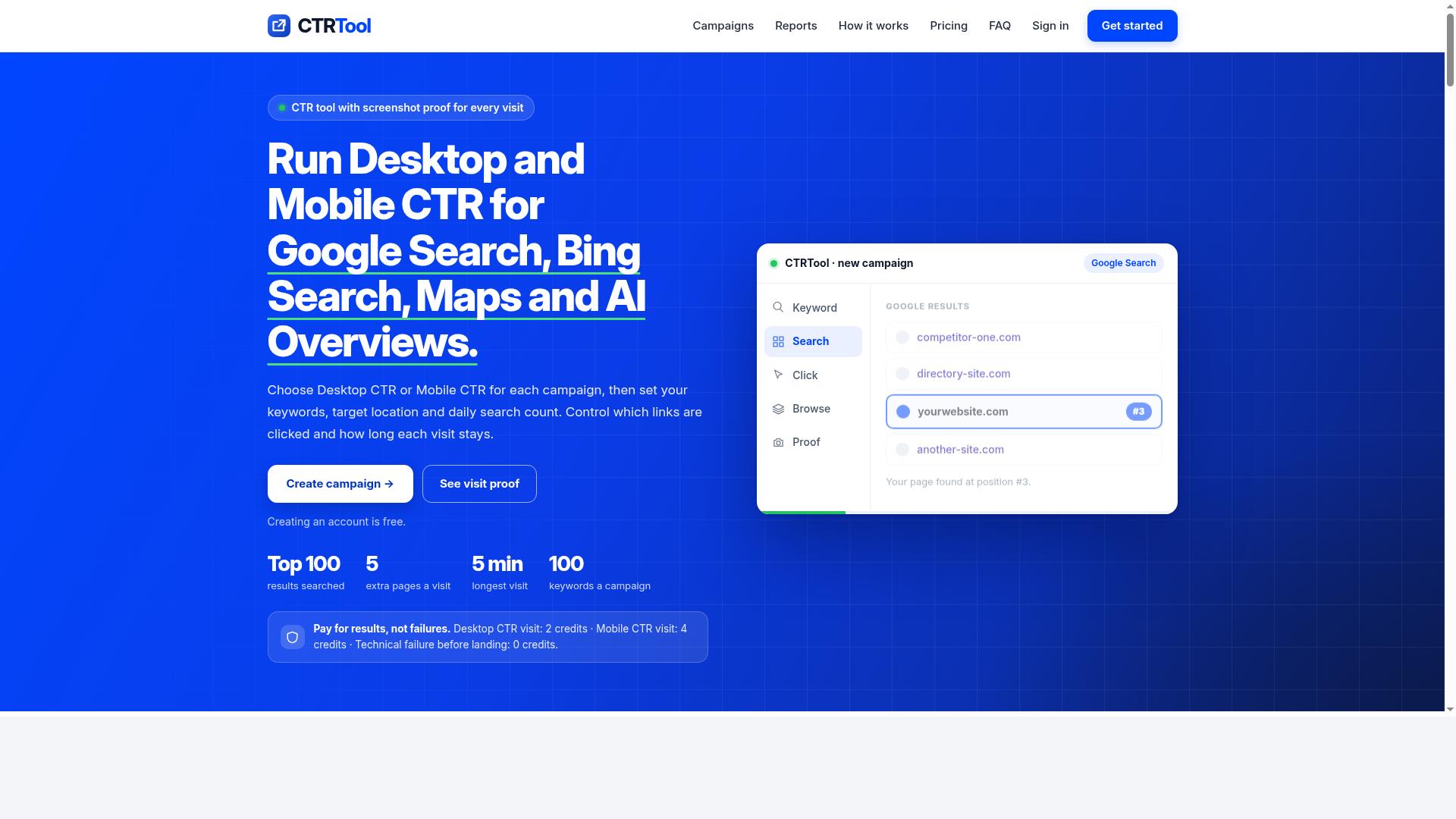
CTRTool is a SaaS CTR campaign tool that runs Desktop and Mobile CTR campaigns for Google Search, Bing Search, Maps, and AI Overviews, with screenshot proof for every visit. It is built around a simple idea: let users shape how a listing is clicked and how long each visit lasts, then show evidence that the visit happened.
Instead of a single generic traffic setting, users pick Desktop CTR or Mobile CTR per campaign. That matters because click-through rate and engagement metrics often differ sharply between devices, and a blended figure can hide which segment is actually responding.
Each campaign is defined by the inputs a marketer controls. The main ones are:
- Keyword targeting for the terms a campaign should support
- Target location to keep activity in the right market
- Daily search count to pace volume over time
- Link selection to control which links are clicked
- Visit duration to set how long each visit stays
This level of control supports campaign management that reads like a real plan rather than a blunt volume push. Users can adjust one variable at a time and watch how engagement metrics respond.
Coverage spans several surfaces where organic traffic is won or lost. CTRTool supports Google Search across the top 100 organic results, Bing Search, Google Maps with up to 50 listings checked, and AI Overviews, where a matching citation is required. That last point matters for AI traffic, since an AI Overview placement only counts when the source is actually cited.
Proof is a core part of the product. Every visit comes with screenshot proof, covering both search and landing screenshots, plus the full visit path. For anyone reviewing traffic quality or explaining results to a client, that record is far more useful than a dashboard total alone.
One honest note sits on the site itself: automated visits do not guarantee rankings. CTRTool is a campaign and evidence tool, not a promise of SERP ranking movement. Readers comparing it with ScaleRankings should weigh that transparency as a strength, since it sets clear expectations about what a CTR campaign can and cannot do.
What Is ScaleRankings?
ScaleRankings is a traffic generation platform that focuses on delivering large volumes of visitors to websites, often used for testing engagement metrics or boosting perceived popularity. In an SEO tool comparison, it is best understood as a broad traffic service rather than a search-focused campaign tool.
The service is typically described as relying on proxy networks and IP rotation to route visits through many different addresses. Combined with varied user agents, this setup aims to make incoming sessions look like they come from many separate devices and locations.
Platforms in this category may include geotargeting and device targeting options, letting users direct visits to specific regions or device types. Campaign automation and volume controls are also common, since the core selling point is scale rather than precision.
Because the traffic is simulated rather than driven by real searches, it lands as a mix of direct traffic and referral traffic. That distinction matters for anyone trying to improve a SERP ranking or measure genuine click-through rate.
ScaleRankings positions itself around volume and reach. A search-specific CTR campaign tool, by contrast, focuses on keyword targeting and clicks that originate from real search engine results. The two approaches solve different problems, and the table below summarizes the general difference.
| Aspect | ScaleRankings (general positioning) | CTRTool (search-focused campaigns) |
|---|---|---|
| Primary goal | High-volume visitor delivery | Improving click-through rate on search results |
| Traffic origin | Simulated visits via proxy networks and IP rotation | Clicks tied to keyword targeting in search |
| Typical use | Testing engagement metrics, perceived popularity | CTR campaigns aimed at SERP ranking signals |
| Targeting | May include geotargeting and device targeting | Keyword and audience targeting |
| Best fit | Broad traffic tests | Search-driven campaign management |
The practical takeaway is that ScaleRankings suits broad traffic experiments, while a search-specific tool suits teams that care about traffic quality in search contexts. Readers weighing the two should decide whether they need raw volume or clicks that align with keyword targeting and SERP behavior.
Features Compared
This section breaks down the core capabilities of both platforms across campaign coverage, proof and transparency, and targeting controls to help you see where each tool fits. The comparison focuses on what matters most in a CTR campaign: whether the tool supports the specific surfaces you want to influence, whether it can show evidence of each visit, and whether it gives you control over where and how that visit happens.
CTRTool is built as a dedicated CTR campaign tool, so its feature set is narrow and specific. ScaleRankings is generally positioned around traffic packages, which means its capabilities tend to be described at a broader level. The three subsections below look at each area in turn.
Campaign Coverage: Search, Maps and AI Overviews
CTRTool supports four distinct campaign types: Google Search CTR, Bing Search CTR, Google Maps CTR, and AI Overview CTR, each with specific requirements for keyword and location targeting. That structure matters because each surface rewards different behavior, and a campaign built for one does not automatically translate to another.
Google Search CTR campaigns work from a search keyword and a click on an organic result. You choose Desktop or Mobile, can search as deep as the top 100 results, and can direct visits to internal pages as well as the target URL. Bing Search CTR follows the same model on Bing.
Google Maps CTR campaigns focus on finding a business listing and clicking its website link, with up to 50 listings checked and city targeting available. AI Overview CTR is the most specific of the four: the visit must find your website inside the overview and click its source link, which requires a matching citation to work at all.
ScaleRankings, by contrast, is generally described as offering broader traffic packages. It may cover a range of traffic sources, but there is no clear indication that it provides dedicated campaign types for Google Search, Bing Search, Maps listings, or AI Overview citations. For readers whose goal is measurable movement on a specific SERP surface, that distinction is the first real fork in the comparison.
Proof and Transparency: Screenshot Verification per Visit
CTRTool provides screenshot proof for every visit, with separate search and landing screenshots, plus full visit paths. This is the feature that separates a verifiable campaign from a traffic count, because it lets you check what actually happened rather than trusting a summary.
The practical value shows up in two places. First, screenshot proof helps verify traffic quality and campaign execution, since you can confirm the keyword was searched, the result was found at a plausible position, and the landing page loaded as intended. Second, it gives agencies client-ready evidence, which is often the difference between a report a client accepts and one they question.
CTRTool also reports keyword positions over time alongside these visit records, so proof and progress sit in the same place. Visits that cannot verify the requested location use no credits, and technical failures before landing are not charged, which keeps the proof model tied to a pay-for-results credit structure.
ScaleRankings typically offers aggregate analytics such as visit counts and referrer data. That is useful for a high-level view, but it generally does not include per-visit screenshot verification, so confirming the details of an individual visit is harder. For buyers who need auditability, this is a meaningful gap.
Targeting Controls and Keyword Position Tracking
CTRTool lets you target by country, state, and city, choose Desktop or Mobile devices per campaign, and track keyword positions over time, including Maps listing order and AI citation order. Selecting "Any country" instead uses a mix of supported locations, which suits campaigns where a single market is not the point.
Delivery is handled through Desktop Chrome windows and real Android phone sessions matched to the target location through managed proxy routes. Each campaign supports up to 100 keywords, and setup covers search depth, daily search counts with timing options, days, hours, and time zone, with daily goals resetting at 00:00 UTC.
The position tracking is the part worth pausing on. Search positions, Maps listing order, and AI citation order are reported separately, so a campaign aimed at an AI Overview can be judged on citation placement rather than being folded into a generic ranking number. One credit balance is shared across all campaign types, websites, and keywords, and up to 100 campaigns can run with 100 keywords each.
ScaleRankings may offer geotargeting and device targeting, and readers should confirm the current scope directly with the provider. What it typically lacks is search-specific position tracking for keyword targeting across Search, Maps, and AI surfaces. CTRTool's controls are therefore more granular for CTR campaigns specifically, while ScaleRankings remains a broader, less search-focused option.
Pricing Compared
Pricing models differ significantly: CTRTool uses transparent monthly credit plans, while ScaleRankings' pricing is less publicly detailed and may be quote-based.
That difference matters for anyone planning AI traffic CTR campaigns on a budget. With CTRTool, you can see the exact monthly cost and the credit allowance before you commit. With ScaleRankings, you may need to request a custom quote before you understand what a campaign will cost.
For campaign management, predictable costs make it easier to plan keyword targeting, device targeting, and A/B testing across several landing pages. A published price list also lets you compare plans side by side instead of waiting on a sales conversation.
The table below summarizes what is publicly known about each provider's pricing structure. CTRTool's figures come from its published plan page. ScaleRankings' column stays general because its rates are not listed publicly.
| Pricing Aspect | CTRTool | ScaleRankings |
|---|---|---|
| Pricing model | Monthly credit plans in USD | Not publicly listed, may be quote-based |
| Entry plan | Starter at $59/month for 2,000 credits | Unknown without a quote |
| Top published plan | Agency at $699/month for 40,000 credits | Unknown without a quote |
| Cost per visit | Tied to credit use per visit | Not publicly detailed |
| Free account creation | Yes | Not publicly detailed |
CTRTool's Credit Plans and Pay-for-Results Model
CTRTool offers four monthly plans: Starter at $59/month for 2,000 credits (up to 1,000 Desktop CTR visits or 500 Mobile CTR visits) and Growth at $125/month for 5,000 credits (up to 2,500 Desktop or 1,250 Mobile visits).
Two larger tiers are also published. Scale costs $399/month for 20,000 credits (up to 10,000 Desktop or 5,000 Mobile visits), and Agency costs $699/month for 40,000 credits (up to 20,000 Desktop or 10,000 Mobile visits). Growth is marked Recommended on the plan page.
The credit system is what makes this a pay-for-results model. You spend credits on actual visits rather than on seat licenses or vague impressions, and the costs are itemized clearly:
- Desktop CTR visit: 2 credits
- Mobile CTR visit: 4 credits
- Verified search without a match: 1 credit
- Technical failure before landing: 0 credits
Because Desktop visits cost fewer credits than Mobile visits, device targeting directly affects how far your allowance stretches. A campaign focused on desktop search engine results will cover roughly twice as many visits as a mobile-first campaign on the same plan.
Two practical details round out the model. Unused credits roll over while your subscription is active and expire when cancellation takes effect, so credits are not lost between billing cycles. Creating an account is free, and custom development carries a separate, agreed one-time fee.
The plan page also notes limited launch pricing, with prices rising 30% on November 15. Readers comparing options should check the current rate before budgeting.
ScaleRankings, by contrast, does not publish its pricing. Its rates may be custom and quote-based, so any cost comparison requires contacting the vendor directly. Without a public price list, it is difficult to weigh its traffic generation offer against CTRTool's published credit allowances or to plan campaign automation spend in advance.
Who Should Choose CTRTool
CTRTool is ideal for SEO practitioners and agencies running CTR campaigns for their own or client websites who need verifiable proof and granular targeting across Google Search, Bing Search, Maps, and AI Overviews. The platform is built around the daily realities of campaign management, where results must be shown to a client and every visit must be justified.
That audience is not hypothetical. CTRTool's stated target users are exactly these professionals, and its guidance even covers working with tier links, PBNs, and test properties. In other words, the tool assumes you understand campaign structure and want control over how visits are delivered.
The first differentiator is screenshot proof for reporting. Agencies rarely get paid on promises, so being able to show a client what happened in the search engine results matters. When you can document keyword positions and campaign activity visually, the conversation shifts from "trust us" to "here is the evidence."
Reporting is also where keyword position tracking earns its keep. Tracking where a target term sits before, during, and after a campaign lets you connect click-through rate work to movement in SERP ranking. For client work, that timeline is often the single most persuasive artifact in a monthly report.
Granularity is the second reason teams pick CTRTool. Device targeting and geotargeting let a campaign match the audience a client actually cares about, whether that is mobile users in a city or desktop searchers in a region. Rather than spreading visits thin, you concentrate them where the keyword and audience targeting already make sense.
This control pairs naturally with campaign management workflows. You can align a campaign to a specific keyword set, a device profile, and a location, then review how engagement metrics such as bounce rate and time on page respond. For agencies juggling several clients, that structure keeps each account clean and comparable.
The pay-for-results credit model is the third advantage, and for many teams it is decisive. Costs scale with the visits you actually order, so a small test on one landing page and a larger push on a competitive term sit on the same predictable footing. Budget conversations with clients get simpler when spend maps directly to delivered volume.
That structure suits teams that want to scale visits steadily rather than commit to a fixed subscription before they know what works. You can run A/B testing or split testing on landing pages and ad copy, observe the effect on conversion rate, then expand what performs. Predictability, not guesswork, drives the decision.
| Priority | CTRTool | Typical Alternative |
|---|---|---|
| Proof for client reports | Screenshot proof and keyword position tracking | Varies by platform, often less visual |
| Targeting control | Device targeting and geotargeting across Google Search, Bing Search, Maps, and AI Overviews | Generally narrower or less documented |
| Cost structure | Pay-for-results credit model | Commonly subscription based |
| Campaign types | Client sites, own sites, tier links, PBNs, test properties | Depends on provider |
The honest trade-off is that a credit model rewards teams who plan their volume. If you prefer a flat monthly fee regardless of usage, that preference is worth weighing. For agencies whose clients ask "what did we get for this spend," the pay-for-results approach usually answers the question more directly.
CTRTool fits best when reporting credibility, targeting precision, and predictable scaling all matter at once. Teams that treat organic traffic as a managed asset, measured through an analytics dashboard and defended with evidence, will find the fit natural.
Who Should Choose ScaleRankings
ScaleRankings may appeal to users who prioritize raw traffic volume and broad campaign automation over search-specific proof and targeting. That framing matters, because the tool tends to sit in a different lane than search-focused CTR platforms. Readers weighing an SEO tool comparison should first decide which outcome they actually need.
In general terms, ScaleRankings often suits teams that want to move quickly and let automation handle the heavy lifting. Those users may care less about keyword-level precision inside search engine results and more about keeping campaigns running with minimal manual work.
Below are the common profiles that typically fit this approach. Each is described in broad terms, since public information about the platform's specifics is limited.
- Volume-first marketers: users who want large traffic spikes and treat traffic generation as a numbers game rather than a targeting exercise.
- Engagement testers: teams experimenting with engagement metrics such as bounce rate and session behavior to see how a page responds to heavier visitor flow.
- Hands-off operators: people who prefer campaign automation and would rather not manage keyword lists, device targeting, or geotargeting by hand.
- Broad-awareness campaigns: projects where the goal is general visibility or impression volume rather than measurable movement in SERP ranking.
It is worth being realistic about the trade-off. A volume-oriented approach may deliver faster spikes, but it often gives up the audience targeting and search context that CTR-focused campaigns depend on. Traffic without intent alignment tends to produce weaker conversion rate outcomes.
For readers whose priority is real user traffic tied to specific queries, a search-focused platform is usually the better fit. CTRTool is built around that model, pairing keyword targeting with CTR campaigns aimed at organic traffic signals, so the takeaway is straightforward: choose ScaleRankings for broad volume and automation, and choose a search-specific tool when proof and targeting carry more weight.
Final Verdict
CTRTool wins for SEOs who need transparent, proof-backed CTR campaigns across search, maps, and AI overviews, while ScaleRankings remains a general traffic option for volume-focused use cases. The choice comes down to what you need to see after a campaign ends: verifiable evidence tied to keyword positions, or a broader traffic push with less visibility into how visits were produced.
For campaign management where every click should be accountable, CTRTool's design centers on what you can check rather than what you are asked to trust. ScaleRankings, by contrast, is positioned around wider traffic delivery, and readers evaluating it should confirm current specifics directly with that provider.
| Differentiator | CTRTool | ScaleRankings |
|---|---|---|
| Proof of visits | Screenshot proof | Generally described, less transparent |
| Visit behavior | Full visit paths | Broad traffic approach |
| Ranking context | Keyword position tracking | Not a stated focus |
| Pricing clarity | Clear credit pricing | Varies, confirm with provider |
| Best fit | SEOs needing accountable CTR campaigns | Volume-focused traffic needs |
The screenshot proof and full visit paths matter because CTR campaigns live or die on whether the visits look and behave like real user traffic. Keyword position tracking adds the other half of the picture, letting you connect campaign activity to SERP ranking movement over time. Clear credit pricing keeps spend predictable, which is a meaningful advantage when you are running repeated campaigns across search, maps, and AI overviews.
ScaleRankings' broader approach may suit buyers who mainly want traffic volume and are comfortable with less detail about how each visit was generated. That is a legitimate use case, but it is a different job than running keyword-targeted CTR campaigns with an audit trail.
If you want to get started or ask questions about CTRTool, the support email listed in the FAQ is vaibhav@autoblogging.ai. Reach out there for details on campaigns, credits, or anything covered in this SEO tool comparison.
Frequently Asked Questions
What is the main difference between CTRTool and ScaleRankings?
CTRTool is a dedicated CTR campaign tool for Google Search, Bing Search, Maps and AI Overviews, and it provides screenshot proof for every visit along with full visit paths and keyword position tracking over time. The available research on ScaleRankings does not describe its features, platforms or capabilities in detail, so a feature-by-feature comparison isn't possible from verified sources. We recommend evaluating ScaleRankings directly against your own requirements.
Does CTRTool provide proof that campaign visits actually happened?
Yes. CTRTool is built around screenshot proof for every visit, with search and landing screenshots provided as separate proof images, plus full visit paths. This lets SEO practitioners and agencies verify that each campaign visit occurred as intended. ScaleRankings' proof or reporting mechanisms are not described in the sources we reviewed.
Which platforms and campaign types does CTRTool support?
CTRTool runs Desktop and Mobile CTR campaigns for Google Search, Bing Search, Maps and AI Overviews. You choose Desktop CTR or Mobile CTR per campaign, set keywords, and target a location. The researched sources do not specify which platforms ScaleRankings supports, so check with them directly if platform coverage is a deciding factor.
How much does CTRTool cost, and how does pricing work?
CTRTool uses monthly plans in USD: Starter is $59/month for 2,000 credits (up to 1,000 Desktop CTR visits or 500 Mobile CTR visits), and Growth is $125/month for 5,000 credits (up to 2,500 Desktop or 1,250 Mobile visits). It works on a pay-for-results credit model, so credits map directly to visits. Pricing for ScaleRankings is not stated in the available sources, so we can't compare costs here.
Can I target specific countries or cities with CTRTool campaigns?
Yes. CTRTool is a global online service, and campaigns can target a chosen country with an optional state and city, or "Any country" to use a mix of supported locations. No country restrictions are stated. ScaleRankings' targeting options are not described in the researched sources.
Who is CTRTool designed for, and how do I get support?
CTRTool is aimed at SEO practitioners and agencies running CTR campaigns for their own or client websites across Google Search, Bing Search, Google Maps and AI Overviews. Support is available by email at vaibhav@autoblogging.ai. If you're weighing both tools, we suggest testing CTRTool's screenshot-proof campaigns alongside your evaluation of ScaleRankings.